Restrict Microsoft Office Macro Settings

Reducing risk from malicious documents.

Malicious Office macros are a frequent entry point for ransomware and credential theft, so restricting macro settings is an Essential Eight control that blocks unsafe execution and reduces initial compromise risk.

Overview

Malicious Microsoft Office macros remain a common and effective attack vector for cyber threats, including ransomware and credential theft.

By exploiting trusted document formats, attackers can gain an initial foothold in an organisation’s environment with minimal user interaction.
Within the ACSC Essential Eight, restricting Microsoft Office macro settings is a key mitigation strategy designed to reduce this risk by preventing unauthorised or unsafe macro execution.

The Challenge

While many organisations have policies addressing macro use, maintaining effective enforcement across an enterprise environment is challenging.

Common challenges include:
  • Inconsistent macro settings across devices
  • Legacy applications requiring macro exceptions
  • Limited visibility into actual macro configuration and usage
  • Reliance on point-in-time checks or manual validation

As environments evolve and applications are updated, macro controls can drift out of alignment. Without continuous oversight, organisations may assume protections are in place while unsafe configurations persist.

Some pertinent figures:

of ransomware attacks against organisations start with phishing attempts - Verizon Data breach Report 135d, 2021.
0 %
of malware delivery mechanisms is made up of malicious macros in Microsoft Office documents - Cofense 135d study, 2018.
0 %
The average cost of a ransomware recovery - Sophos f35d.
$ 0

How Introspectus Helps

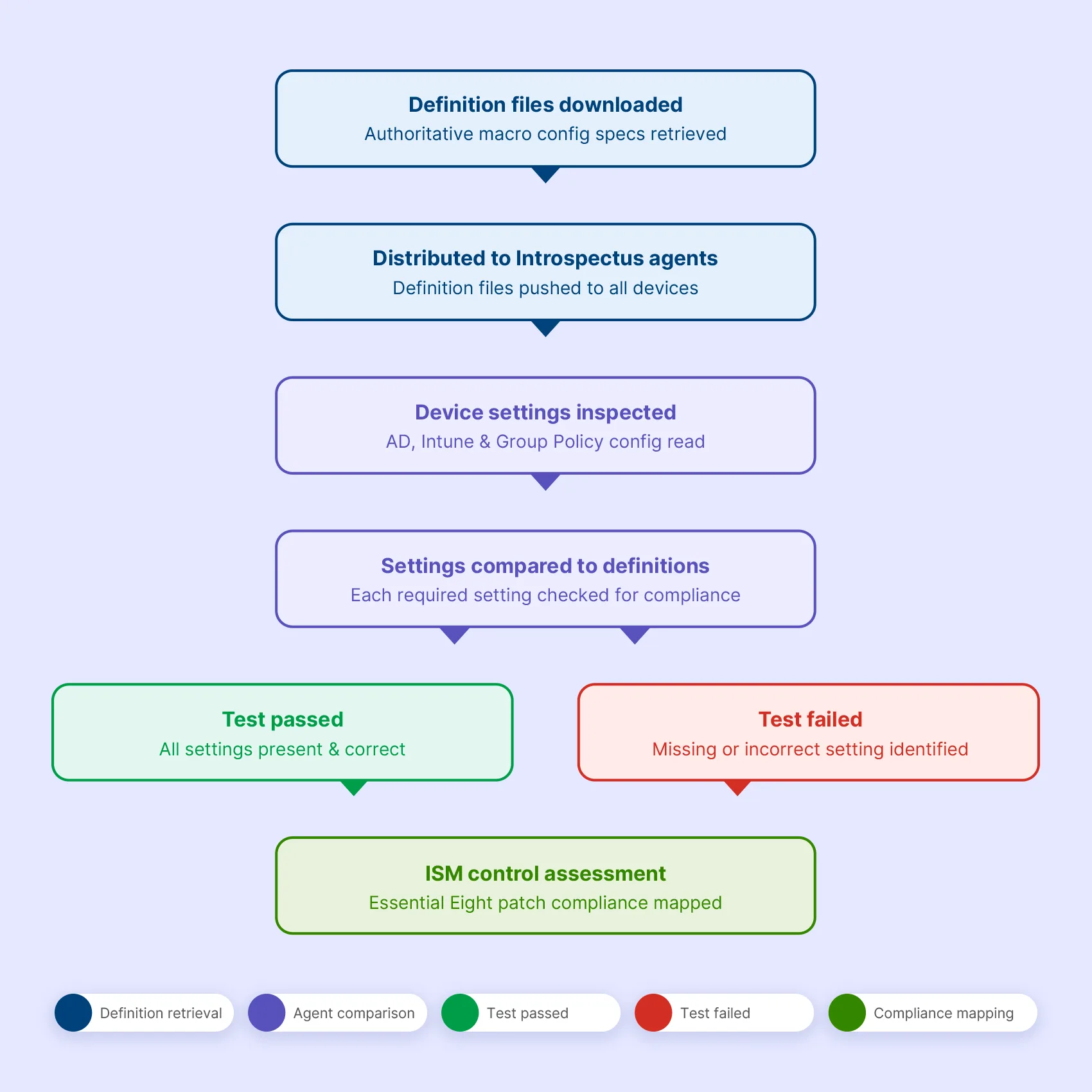
Introspectus assesses macro configuration by comparing actual device settings against a curated set of definition files authoritative specifications of how macro controls should be configured across AD, Intune, and related policy surfaces.

The Introspectus agent downloads the latest definition files and compares them against the macro-related settings present on each device. Every required setting is checked: whether macros are disabled for standard users, whether internet-sourced macros are blocked, whether antivirus scanning is active, and whether users are prevented from overriding these controls.

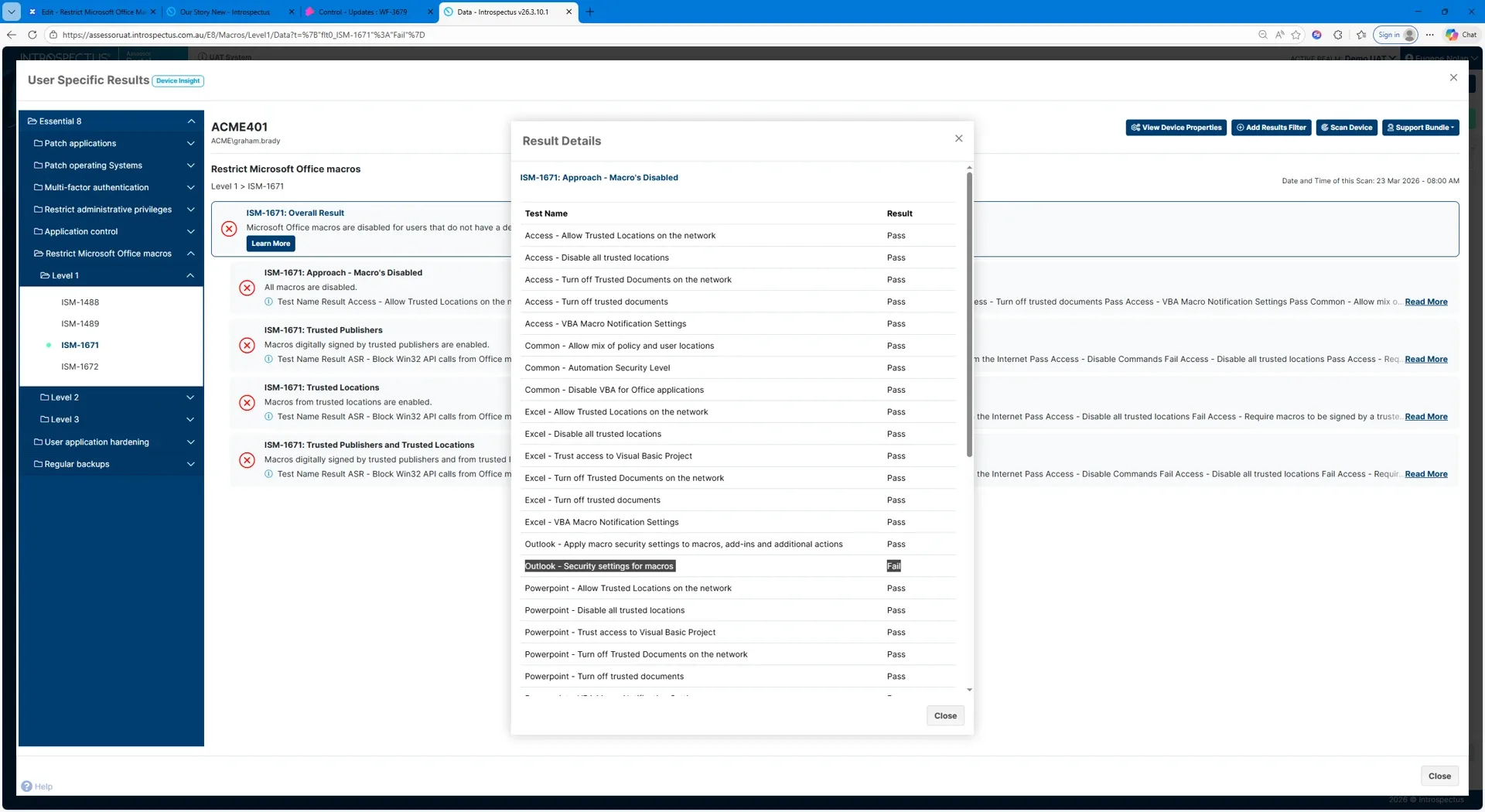
The result is unambiguous. If all required settings are in place the test passes. If any setting is missing or incorrectly configured the test fails and the specific gap is identified. Results are mapped directly to the applicable ISM controls and Essential Eight maturity requirements, producing clear, audit-ready evidence of macro configuration compliance across the environment.

How Introspectus helps:

Designed for Governance and Assurance

Restricting Office macros is a preventative control that plays a critical role in reducing the likelihood of initial compromise.

Executives and boards require confidence that high-risk document-based attack vectors are actively managed.

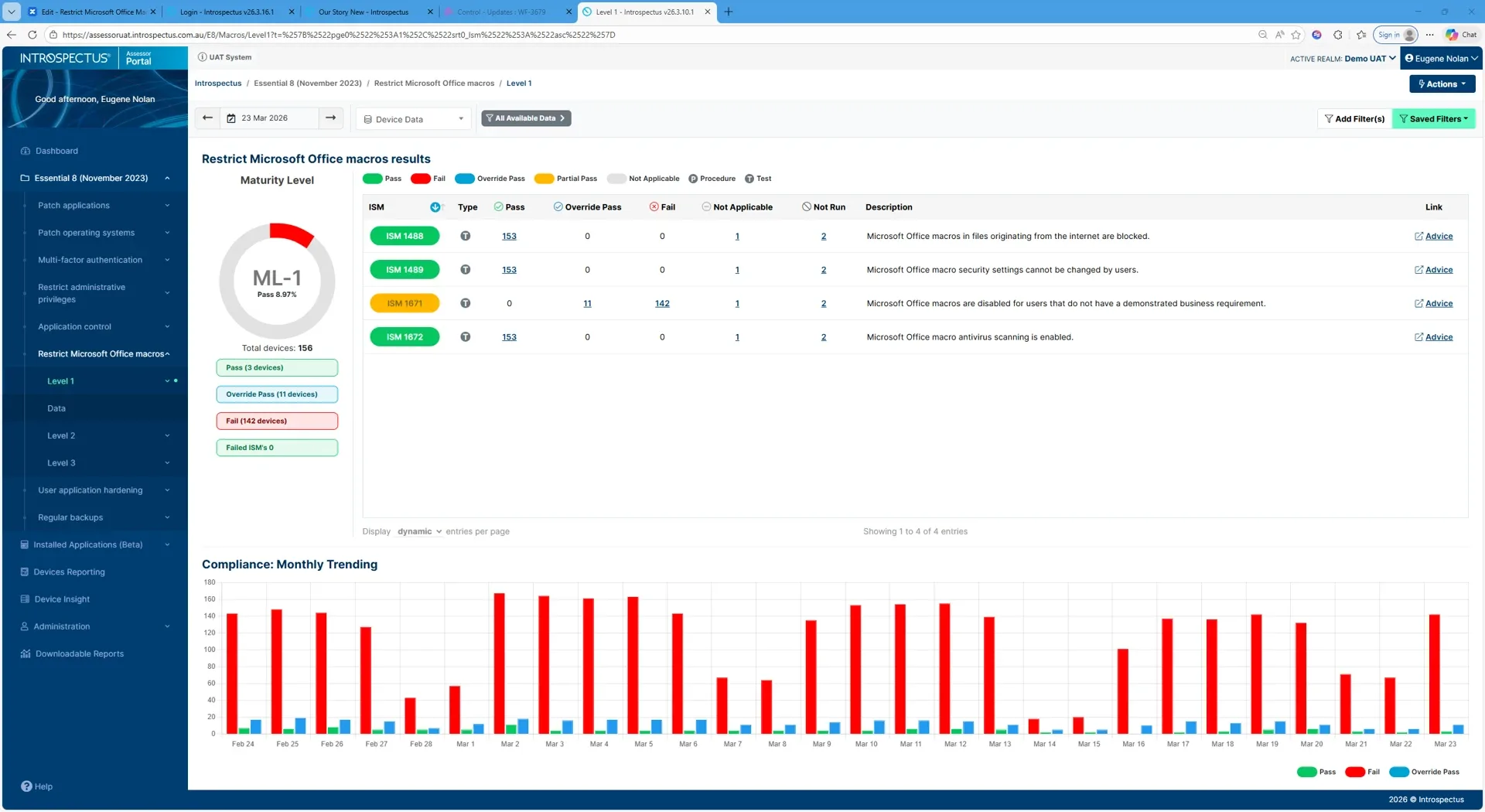
Introspectus delivers executive-level insight into macro control effectiveness, supporting informed decision-making, risk prioritisation and predictable audit outcomes without disrupting business operations.

Click image to enlarge

The Outcome

With Introspectus, macro restriction becomes a continuously assured control rather than a static configuration setting. Organisations reduce exposure to document-based threats, maintain Essential Eight alignment, and strengthen confidence in their overall cyber security posture.

Know your security. Prove your compliance. Improve continuously.

How Introspectus Helps

Each agent compares the current patch list against what is actually installed on its device. Any gap between what has been released and what is deployed is immediately surfaced. Critically, Introspectus pays particular attention to the timing of patch deployment not just whether a patch is present, but when it was applied.

This temporal dimension is central to Essential Eight compliance, where the difference between a patch applied on day two versus day thirty can mean the difference between maturity levels, and between an environment that was protected and one that was exposed.

This combination of daily patch intelligence, severity-based filtering, agent-level validation, and deployment timing analysis gives organisations a real-time, evidence-based view of their operating system patch posture mapped directly to the ISM controls applicable to the Essential Eight patch operating systems strategy.

The Challenge with Patch Operating Systems

The visibility gap here is particularly consequential. A patch may be approved and scheduled, yet never successfully applied due to a failed deployment, a device that was offline during the maintenance window, a reboot that was deferred, or a system that exists outside managed channels entirely.

Organisations that rely solely on deployment tooling to confirm patch status are measuring intent, not reality. The ACSC is explicit on this point: organisations need to confirm patches have been applied successfully, not merely that they were dispatched.

Patch Operating Systems Overview

Within the Essential Eight framework, patching operating systems is a core and non-negotiable control. The ACSC sets clear expectations: patches for internet-facing infrastructure must be applied within 48 hours when identified as critical or where working exploits exist, and within two weeks for standard releases.

Patches for workstations, servers, and network devices must be applied within one month, with tighter timeframes applying in high-threat environments. Critically, the ACSC also mandates that vulnerability scanning occurs at least daily for internet-facing systems and at least fortnightly for workstations and non-internet-facing infrastructure not to replace patching, but to confirm it has actually occurred.

How Introspectus Works

From this inventory, Introspectus performs targeted web intelligence gathering. For each application identified, the platform locates the top five authoritative sources of patch and release information vendor security advisories, release notes, and vulnerability databases and retrieves that content into a central repository.

Aletheia, Introspectus’s AI analysis agent, then reads and analyses this content to extract the intelligence that matters for application patching: the latest available version, whether a release addresses a security vulnerability, the severity of that vulnerability, and all information relevant to the Essential Eight application patching requirements. This structured intelligence is mapped directly to the applicable ISM controls, producing defensible, audit-ready evidence of an organisation’s application patch compliance posture.

The Challenge with Patch Applications

A critical and frequently overlooked problem is the visibility gap. Organisations may believe their applications are current when, in reality, patches have silently failed, devices have missed deployment windows, or software has been installed outside of managed channels entirely.

Without continuous inspection at the endpoint level, these gaps go undetected until an audit or, worse, a breach.

Patch Applications Overview

Within the Essential Eight standard, patching applications is a dedicated and non-negotiable control. The ACSC specifies clear timeframes: critical vulnerabilities in internet-facing services must be addressed within 48 hours, commonly used applications such as office productivity suites, web browsers, email clients and PDF software must be patched within two weeks of release, and all other applications within one month.

For organisations in high-threat environments, the bar is higher still. Meeting these requirements consistently across hundreds of distinct applications deployed across thousands of endpoints is not achievable through manual effort alone.