


Internet Usage OLD

Internet Usage

What is Internet Usage Tracking?

Internet Usage is a measure of how long users in your organisation spend on the Internet as part of normal day-to-day activities. 

Existing internet reporting tools provide statistics of internet usage based on downloads or the number of times a user visits a website. These tools assess a user’s interaction with the internet by broadly looking at all browser activity, whether active or dormant, and incorrectly assume that web traffic is being generated even if the browser is not being used.

Organisations can incorrectly assume that a staff member was on social media all day when in reality the staff member looked at social media at the start of the day and minimised the web browser instead of closing the browser. Due to the design of social media websites and current reporting tools, the web browser in its minimised state keeps updating existing tools, generating large amounts of traffic and therefore incorrectly reporting that the staff member was using social media all day.


Woman using a computer
Mobile phone microsoft security

Why is Internet Usage Tracking important?

Introspectus records active browser windows and actual usage, removing the assumptions made by other tools. Introspectus records the browser activity of a users ‘active’ window.

Introspectus records the top level web address (URL) being used of each ‘in focus’ browser window and records the start time the window becomes ‘active’ and the time when the window is no longer ‘active’. This information is used to generate reports to inform you how users interact with the internet.

Introspectus will help you identify locations or users with application performance related issues.

Introspectus Key Features

What's the solution?

Introspectus is different from other reporting tools. Introspectus gathers user web activity statistics to measure how long end users actually spend on the internet. As a decision maker within an organisation, you can identify:

  • Staff members utilisation of their computers.
  • Approximate start and end times (dependent on computer usage).
  • Confirm that staff are working when they are remote from the office.

This information is presented in a number of ways, as shown in our different report types below.

Assessor Internet Usage

Internet Usage Reports

Our goal is to provide actionable analytics and insights for your business needs. Introspectus gives you a clearer picture of how your staff interact with the internet every day.

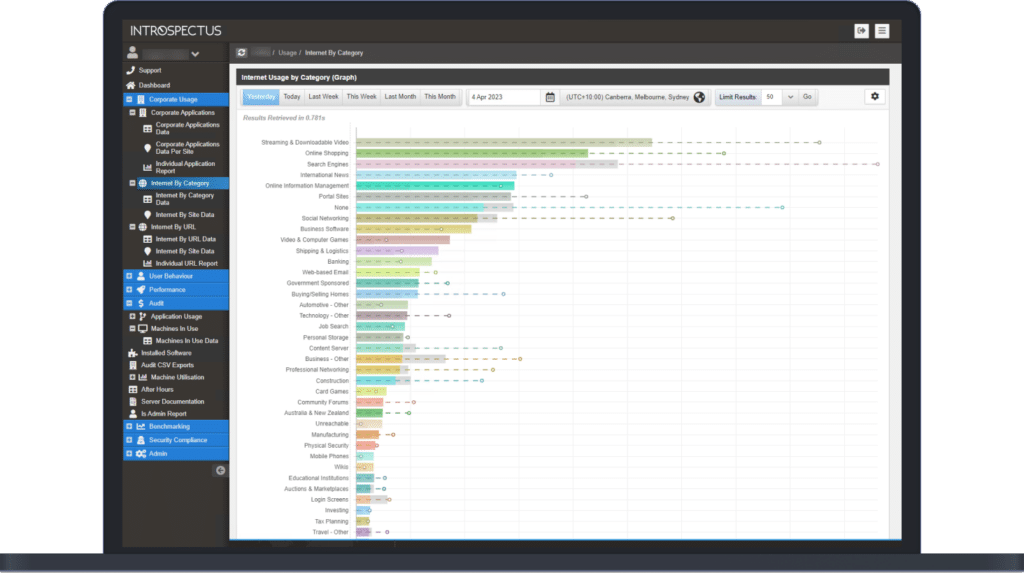
Corporate Usage – Internet by Category

This Introspectus report:

  • Gives the organisation an overview of the time spent by your staff in different web categories, as an accumulated value over a specified time period.
  • Shows the top 20 categories listed in order of most used to least used.
  • Displays the average for a longer period of time to compare how this behaviour is changing.
  • Provides underlying data used to generate the summary report.
  • Allows you to quickly group data based on automatically assigned categories, and allows you to filter data. This is very useful in finding web-related security concerns in an organisation, such as data leak prevention and unapproved web-based systems.

Corporate Usage – Internet by URL

This Introspectus report:

  • Gives an organisation an overview of the time that your staff are spending on websites as an accumulated value over a specific time period.
  • Shows the top 20 Web addresses listed in order of most used to least used.
  • Displays the average for a longer period of time to compare how this behavior is changing.
  • Provides underlying data used to generate the summary report.

User Behaviour – Internet

This Introspectus report:

  • Give the organisation an overview of the time spent by your staff on the internet.
  • Displays the total time spent on the internet for non-corporate-based web addresses.
  • Shows the top 20 staff member’s time on the internet, listed in order of most used to least used.
  • Displays the average for a longer period of time to compare how this behaviour is changing.
  • Provides the ability to view the underlying data used to generate the summary report.

User Behaviour – Individual

This Introspectus report:

  • Provides a high-level overview of a staff member’s day, differentiating between ‘work related’ and ‘non-work related’ activities.
  • Displays a staff member’s day divided into 15-minute slices of corporate (Green) and non-corporate (Red) activities.
  • Shows the first computer activity of the day and the last computer activity of the day.
  • Displays computer activity at any time of the day, from any work-related workstation and any location.

How Introspectus Helps

Each agent compares the current patch list against what is actually installed on its device. Any gap between what has been released and what is deployed is immediately surfaced. Critically, Introspectus pays particular attention to the timing of patch deployment not just whether a patch is present, but when it was applied.

This temporal dimension is central to Essential Eight compliance, where the difference between a patch applied on day two versus day thirty can mean the difference between maturity levels, and between an environment that was protected and one that was exposed.

This combination of daily patch intelligence, severity-based filtering, agent-level validation, and deployment timing analysis gives organisations a real-time, evidence-based view of their operating system patch posture mapped directly to the ISM controls applicable to the Essential Eight patch operating systems strategy.

The Challenge with Patch Operating Systems

The visibility gap here is particularly consequential. A patch may be approved and scheduled, yet never successfully applied due to a failed deployment, a device that was offline during the maintenance window, a reboot that was deferred, or a system that exists outside managed channels entirely.

Organisations that rely solely on deployment tooling to confirm patch status are measuring intent, not reality. The ACSC is explicit on this point: organisations need to confirm patches have been applied successfully, not merely that they were dispatched.

Patch Operating Systems Overview

Within the Essential Eight framework, patching operating systems is a core and non-negotiable control. The ACSC sets clear expectations: patches for internet-facing infrastructure must be applied within 48 hours when identified as critical or where working exploits exist, and within two weeks for standard releases.

Patches for workstations, servers, and network devices must be applied within one month, with tighter timeframes applying in high-threat environments. Critically, the ACSC also mandates that vulnerability scanning occurs at least daily for internet-facing systems and at least fortnightly for workstations and non-internet-facing infrastructure not to replace patching, but to confirm it has actually occurred.

How Introspectus Works

From this inventory, Introspectus performs targeted web intelligence gathering. For each application identified, the platform locates the top five authoritative sources of patch and release information vendor security advisories, release notes, and vulnerability databases and retrieves that content into a central repository.

Aletheia, Introspectus’s AI analysis agent, then reads and analyses this content to extract the intelligence that matters for application patching: the latest available version, whether a release addresses a security vulnerability, the severity of that vulnerability, and all information relevant to the Essential Eight application patching requirements. This structured intelligence is mapped directly to the applicable ISM controls, producing defensible, audit-ready evidence of an organisation’s application patch compliance posture.

The Challenge with Patch Applications

A critical and frequently overlooked problem is the visibility gap. Organisations may believe their applications are current when, in reality, patches have silently failed, devices have missed deployment windows, or software has been installed outside of managed channels entirely.

Without continuous inspection at the endpoint level, these gaps go undetected until an audit or, worse, a breach.

Patch Applications Overview

Within the Essential Eight standard, patching applications is a dedicated and non-negotiable control. The ACSC specifies clear timeframes: critical vulnerabilities in internet-facing services must be addressed within 48 hours, commonly used applications such as office productivity suites, web browsers, email clients and PDF software must be patched within two weeks of release, and all other applications within one month.

For organisations in high-threat environments, the bar is higher still. Meeting these requirements consistently across hundreds of distinct applications deployed across thousands of endpoints is not achievable through manual effort alone.