Essential Eight Cybersecurity Strategies OLD

Essential Eight security

Do you need to adopt the Essential Eight Mitigation Strategies to reduce the risk of cyber intrusions?

The Australian Cyber Security Centre (ACSC) has mandated the implementation of the Essential Eight Mitigation Strategies  for the mitigation of targeted cyber intrusions. This is both for Federal Government Agencies and Non-corporate Commonwealth Entities (NCEs). The ACSC strongly recommends all medium to large businesses adopt these strategies.
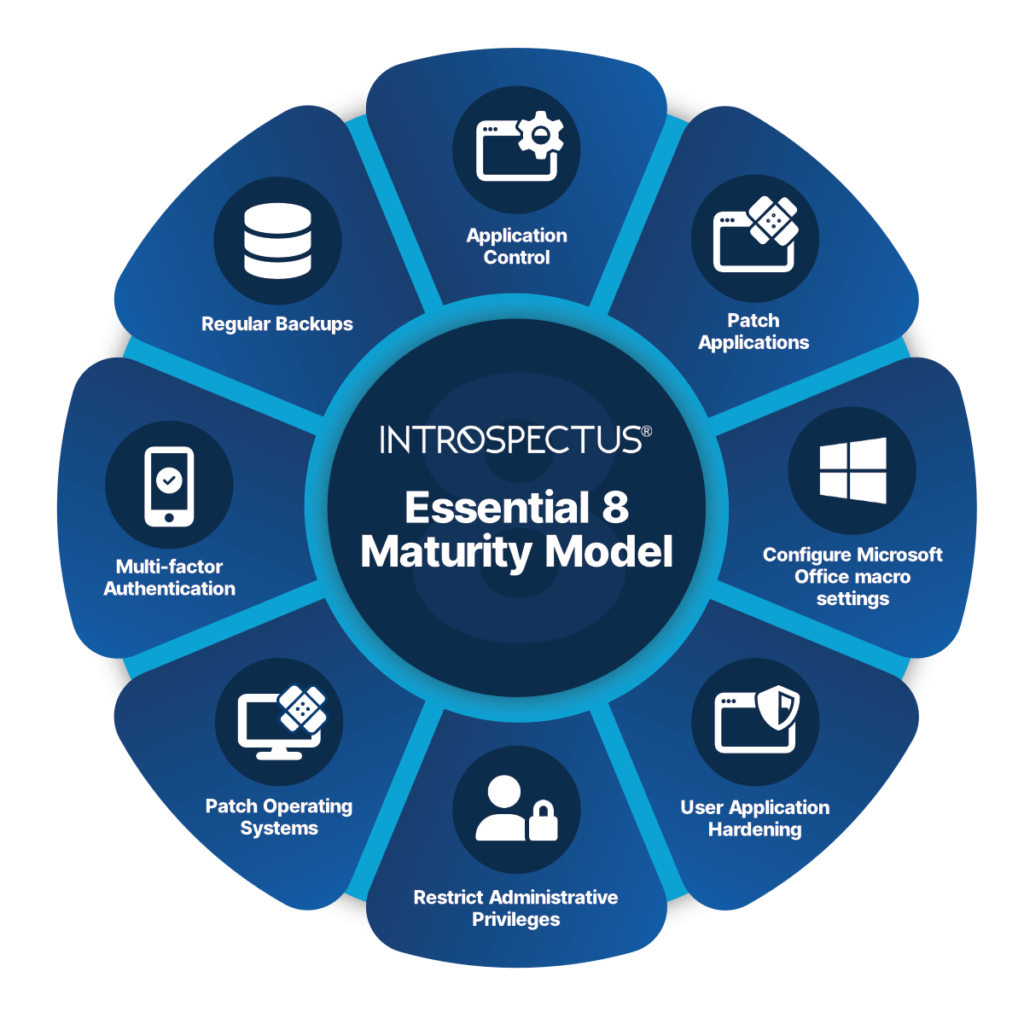
The Essential Eight Maturity Model

ACSC’s Mitigation Strategies

Essential Eight Strategies

Until now it has been very difficult for an organisation to validate that it has effective security controls in place to secure its IT infrastructure in line with the ACSC’s requirements.

Introspectus provides an independent monitoring capability that is separate from the organisation’s security enforcement products. It provides assurance that an organisation’s security controls are in place for the Essential Eight mitigations, and more importantly that they are working.

Introspectus Assessor is a security auditing tool that focuses on an organisation’s compliance with the Australia Cyber Security Centre’s Essential Eight

Prevent Malware​

Implementation of the Essential Eight will significantly reduce the likelihood of compromise by Ransomware.

Limit Cyber Security Incidents​

By implementing the Essential Eight, organisations reduce their risk of compromise by a targeted attacker by 85%.​

What are the Essential Eight?

The Australian Cyber Security Centre (ACSC) has developed prioritised mitigation strategies, in the form of the Strategies to Mitigate Cyber Security Incidents. This is to help organisations protect themselves against various cyber threats. The most effective of these mitigation strategies are the Essential Eight.

Patch Applications

Patch/mitigate computers with extreme risk vulnerabilities within 48 hours by using the latest version of applications. e.g. Flash and web browsers.

Why: Security vulnerabilities in applications can be used to execute malicious code on systems.

Patch Operating Systems

Patch/mitigate computers with extreme risk vulnerabilities within 48 hours by using the latest supported operating system version.

Why: Security vulnerabilities in operating systems can be used to further the compromise of systems.

Multi-Factor Authentication

Implement multi-factor authentication, including for all remote accesses, and for all users when they perform a privileged action or access an important data repository.

Why: Stronger user authentication makes it harder for adversaries to access sensitive information and systems.

Restrict Administrative Privileges

Restrict administrative privileges to operating systems and applications based on user duties. Regularly revalidate the need for privileges. Don’t use privileged accounts for reading email and web browsing.

Why: Admin accounts are the keys to the kingdom. Adversaries use these accounts to gain full access to information and systems.

Application Control

Prevent execution of unapproved/malicious programs, including .exe, DLL, scripts, and installers by Application Control approved/trusted programs.

Why: All non-approved applications (including malicious code) are prevented from executing.

Restrict Microsoft Office Macro Settings

Configure settings to block macros from the Internet. And, only allow vetted macros. Either in trusted locations with limited write access or digitally signed with a trusted certificate.

Why: Microsoft Office macros can be used to deliver and execute malicious code on systems.

User Application Hardening

Configure web browsers to block Flash, ads, and Java on the Internet. Disable unneeded features in Microsoft Office, web browsers, and PDF viewers.

Why: Configure web browsers to block Flash, ads, and Java on the Internet. Disable unneeded features in Microsoft Office, web browsers, and PDF viewers.

Regular Backups

Perform daily backups of important new/changed data, software, and configuration settings, stored disconnected, retained for at least three months. Test restoration initially, annually, and when IT infrastructure changes.

Why: To ensure information can be accessed again following a cyber security Incident (e.g. after a successful ransomware Incident).

Understanding the Cyber Threat Landscape

The threat landscape is continually evolving with adversaries continually looking for ways to infiltrate and extort organisations and individuals.  Some of the more popular attacks currently affecting Australian organisations include:

  • Ransomware
    A type of malware that encrypts a victim’s files and demands a ransom payment in exchange for the decryption key.  This threat has been on the rise globally and can severly disrupt business operations and result in financial losses.
  • Supply Chain Attacks
    These attacks involve compromising a trusted third-party vendor or supplier to gain unauthorised access to an organisation’s network or systems. Attackers exploit vulnerabilities in the supply chain to infiltrate and exploit target organisations.
  • Phishing Attacks
    Phishing is a technique used by adversaries to trick individuals into revealing sensitive information such as login credentials or financial details.  These attacks often occur through fraudulent emails, text messages, or phone calls, where the attackers impersonate legitimate entities.
  • Business Email Compromise (BEC)
    These attacks involve an adversary intercepting standard business transactional emails such as invoices, to intercept and impersonate payment transactions. BEC is a large and growing problem that targets organisations of all sizes across every industry globally.

This data breach occurred because Optus did not secure customer information and data online. They used an application programming interface (API) that didn’t require authorisation to access customers’ private and personal information. The person that conducted the cyber-attack on this company requested a ransom amount, or they would leak the data.

Essential Eight Mitigations:
The Essential Eight does not protect against this form of attack.  However, the Information Security Manual (ISM), from which the Essential Eight controls are drawn, contains far reaching security controls that, if implemented, would have aided in this case.  Since the Optus incident, further ISM controls have been defined that address proper securing of APIs and preventing these types of events from occurring again.

Medibank’s information was compromised when cybercriminals targeted an individual with privileged access to this company’s private information. Cybercriminals sold this individual’s information to a bad actor who accessed the information of Medibank’s customers. After that, everyone with insurance through this company experienced a data breach.

Technique used
The Medibank hack began with the theft of credentials belonging to an individual with privileged access to Medibank’s internal systems. These credentials were sold and purchased on the dark web by a bad actor who used them to gain access to Medibank’s internal system.

Once inside, the bad actor identified the location of a customer database and used the stolen privileged credentials to write a script to automate the customer data exfiltration process – a similar data theft mechanism was used in the Optus data breach.

This stolen data was placed into a zip file and extracted through two established backdoors. Medibank’s security team allegedly detected suspicious activity at this point and shut down both backdoors, but not before 200GB of customer data was stolen,

9.7 million Medibank customers were impacted by the breach. Compromised records include:

  • Names
  • Birth dates
  • Passport numbers
  • Information on Medicare claims


Essential Eight Mitigations
A number of controls in the Essential Eight will prevent against this type of attack including but not limited to:

  • ISM 1387 – Administrative activities are conducted through jump servers.
  • ISM 1649 – Just-in-time administration is used for administering systems and applications.
  • ISM 1689 – Privileged accounts (excluding local administrator accounts) cannot logon to unprivileged operating environments.
  • ISM 1173 – Multi-factor authentication is used to authenticate privileged users of systems.

Implementing the Essential Eight provides a strong foundation for improving an organisation’s security posture and reducing the risk of cyber-attacks. However, it’s essential to understand that no security measure can offer complete protection. A holistic approach to cyber security that includes employee education, incident response planning, and ongoing monitoring is crucial in the ever-evolving cyber threat landscape.

Essential Eight FAQs

Here are some common questions on the ACSC’s Essential Eight Maturity Model.

Essential Eight is a set of strategies to mitigate cyber security incidents. These eight primary mitigation strategies make it much more difficult for attackers to gain access to IT systems or processes essential to the operation of your business.

Essential Eight will help your organisation mitigate cybersecurity incidents caused by various cyber threats. These strategies are part of recommendations from the Australian Cyber Security Centre.

To assist organisations with their implementation of the Essential Eight, Maturity Levels have been defined, based on mitigating increasing levels of adversary tradecraft (i.e, tools, tactics, techniques, and procedures) and targeting. They are designed to assist Australian organisations implement the Essential Eight in a graduated manner.

In determining the relevant Maturity Level, an organisation needs to consider:

  • The likelihood of being targeted (which is influenced by their desirability to adversaries),
  • The consequences of a cyber security incident,
  • The requirement for the confidentiality of its data,
  • The requirement for the availability and integrity of systems and data.

All Australian businesses with an annual turnover of $3 million are required to report data breaches within 72 hours to affected customers and the Office of the Australian Information Commissioner.

The Australia Cyber Security Centre (ACSC).

How Introspectus Helps

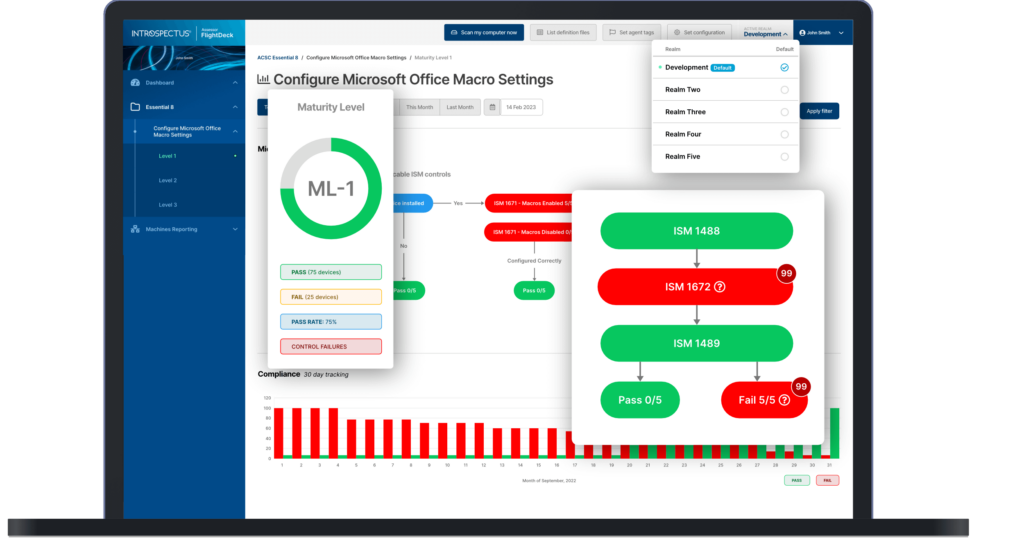
Each agent compares the current patch list against what is actually installed on its device. Any gap between what has been released and what is deployed is immediately surfaced. Critically, Introspectus pays particular attention to the timing of patch deployment not just whether a patch is present, but when it was applied.

This temporal dimension is central to Essential Eight compliance, where the difference between a patch applied on day two versus day thirty can mean the difference between maturity levels, and between an environment that was protected and one that was exposed.

This combination of daily patch intelligence, severity-based filtering, agent-level validation, and deployment timing analysis gives organisations a real-time, evidence-based view of their operating system patch posture mapped directly to the ISM controls applicable to the Essential Eight patch operating systems strategy.

The Challenge with Patch Operating Systems

The visibility gap here is particularly consequential. A patch may be approved and scheduled, yet never successfully applied due to a failed deployment, a device that was offline during the maintenance window, a reboot that was deferred, or a system that exists outside managed channels entirely.

Organisations that rely solely on deployment tooling to confirm patch status are measuring intent, not reality. The ACSC is explicit on this point: organisations need to confirm patches have been applied successfully, not merely that they were dispatched.

Patch Operating Systems Overview

Within the Essential Eight framework, patching operating systems is a core and non-negotiable control. The ACSC sets clear expectations: patches for internet-facing infrastructure must be applied within 48 hours when identified as critical or where working exploits exist, and within two weeks for standard releases.

Patches for workstations, servers, and network devices must be applied within one month, with tighter timeframes applying in high-threat environments. Critically, the ACSC also mandates that vulnerability scanning occurs at least daily for internet-facing systems and at least fortnightly for workstations and non-internet-facing infrastructure not to replace patching, but to confirm it has actually occurred.

How Introspectus Works

From this inventory, Introspectus performs targeted web intelligence gathering. For each application identified, the platform locates the top five authoritative sources of patch and release information vendor security advisories, release notes, and vulnerability databases and retrieves that content into a central repository.

Aletheia, Introspectus’s AI analysis agent, then reads and analyses this content to extract the intelligence that matters for application patching: the latest available version, whether a release addresses a security vulnerability, the severity of that vulnerability, and all information relevant to the Essential Eight application patching requirements. This structured intelligence is mapped directly to the applicable ISM controls, producing defensible, audit-ready evidence of an organisation’s application patch compliance posture.

The Challenge with Patch Applications

A critical and frequently overlooked problem is the visibility gap. Organisations may believe their applications are current when, in reality, patches have silently failed, devices have missed deployment windows, or software has been installed outside of managed channels entirely.

Without continuous inspection at the endpoint level, these gaps go undetected until an audit or, worse, a breach.

Patch Applications Overview

Within the Essential Eight standard, patching applications is a dedicated and non-negotiable control. The ACSC specifies clear timeframes: critical vulnerabilities in internet-facing services must be addressed within 48 hours, commonly used applications such as office productivity suites, web browsers, email clients and PDF software must be patched within two weeks of release, and all other applications within one month.

For organisations in high-threat environments, the bar is higher still. Meeting these requirements consistently across hundreds of distinct applications deployed across thousands of endpoints is not achievable through manual effort alone.